Watch at home - terms and rules of service, enrolment procedure and demonstration video
Terms and rules of service:
Lesson recordings can only be watched at home by the enrolled student; once the watching deadline expires, the student will no longer be able to play the lesson recordings.
When watching lesson recordings at home, if the course includes practical exercises and students want to complete them, students must use their own equipment or software.
If the course webpage states that it "provides 7x24 lab equipment", you can use any browser, anytime and anywhere, to access a set of dedicated instructor equipment exclusively assigned to you, and complete all the practical exercises throughout the entire course.
If the course webpage states "remotely control our center's equipment or software from home via the Internet", students can first make an appointment, then remotely control our center's equipment or software from home via the Internet and follow the course materials to complete the practical exercises.
The student's computer must have Systematic Home Player installed and remain connected to the Internet in order to play lesson recordings. Watch at Home will always include a watermark.
Note: The student's full English name, mobile phone number, email address, and Hong Kong Identity Card number will constitute the watermark displayed when watching lesson recordings at home in the future.
Students can only use the same computer to play lesson recordings and cannot switch to a different computer. Otherwise, Systematic Home Player will stop functioning and will transmit this incident to our center's server for recording and follow-up action by our center.
When playing lesson recordings, Systematic Home Player will transmit playback behavior information to our center's server for recording, enabling our center to calculate class attendance rate.
When playing lesson recordings, Systematic Home Player will automatically detect whether the student's computer is simultaneously running programs that threaten the copyright of lesson recordings. Upon detection, Systematic Home Player will immediately stop playback and will transmit this incident to our center's server for recording and follow-up action by our center.
Our center reserves the final decision-making authority and right to exercise "cessation of students' home watching of lesson recordings, requiring instead that lesson recordings be watched at school" at any time. Students cannot object, and tuition already paid will not be subject to any refunds.
Download the demonstration video to confirm your computer meets minimum playback requirements:
encrypted and watermarked demonstration video (video is approximately one hour in length).
Right-click on the downloaded sample_movie.zip file and select "Extract All" to decompress it. After extraction, the following three files should appear. Note that these files cannot be opened directly and must be opened using Systematic Home Player below:
Lesson1.mp4
Lesson1_t.mp4
Lesson1.txt
and install Systematic Home Player on your computer. Basic computer configuration is as follows:
Central Processing Unit (CPU): Intel Core i3 or higher
Memory (RAM): 4GB or more
Hard Disk Space: 10GB or more free space
Display Card: 2MB or more memory
Operating System: Windows 10 (64-bit) or Windows 11 (64-bit)
Students enrolling Watch at Home courses may choose to rent a laptop provided by our center:
USB 3.0*2 / 3.5mm headphone/microphone jack / Mini HDMI
WiFi 802.11n, Bluetooth connectivity
Mini HDMI, microSD card reader
Windows 10 operating system
1.39kg ultra-thin, lightweight and portable
332 x 214 x 21.3mm
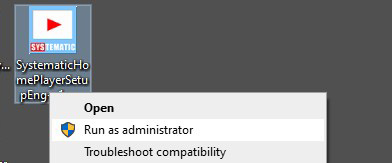
Right-click on the downloaded SystematicHomePlayerSetupEng-v1.exe file and select "Run as administrator" to begin installation.
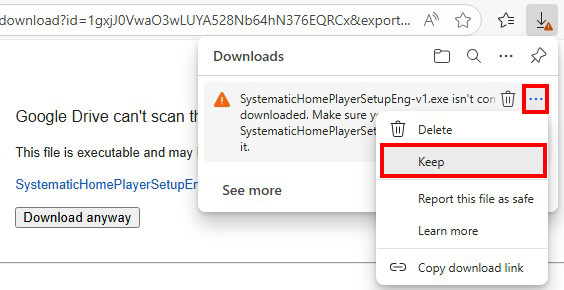
Note 1: If the message shown in the image below appears in the corner of your browser, you must click the "..." and select "Keep" to save the file:
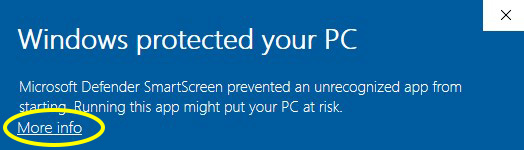
Note 2: If the "Windows protected your PC" screen shown in the image below appears during installation, select "More info", then select "Run anyway" to continue installing Systematic Home Player:
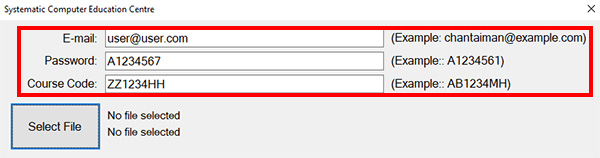
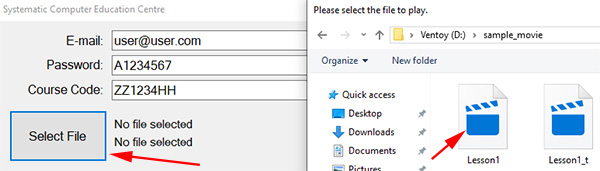
After installation is complete, open Systematic Home Player. In the "E-mail" field, enter user@user.com; in the "Password" field, enter A1234567; in the "Course Code" field, enter ZZ1234HH, as shown in the image below:
Click "Select File", choose the Lesson1.mp4 file extracted earlier, click "Open", then click "Login", as shown in the image below:
Systematic Home Player will then open and play the demonstration video. Students may observe the quality of the display and sound.
After successfully watching the sample video, check the following item:
* I have read and agree to "Watch at home - terms and rules of service"