課程名稱:Microsoft Certified Azure AI Apps and Agents Developer Associate 國際認可證書課程 (1 科 Microsoft 雲端智能代理開發)
- 簡稱:Azure AI Developer Training Course |
AI-103 Developing AI Apps and Agents on Azure
1. Prepare to develop AI solutions on Azure
1.1 About Artificial Intelligence
1.2 About Microsoft Foundry
1.2.1 Microsoft Foundry projects
1.2.2 The Microsoft Foundry portal
1.2.3 Foundry Tools / Azure AI Services / Azure Cognitive Services
1.2.4 Developer tools and SDKs
1.2.5 Development tools and environments
1.2.6 The Foundry Toolkit extension for Visual Studio Code
1.2.7 GitHub and GitHub Copilot
1.2.8 Programming languages, APIs, and SDKs
1.3 Responsible AI
1.3.1 Fairness
1.3.2 Reliability and safety
1.3.3 Privacy and security
1.3.4 Inclusiveness
1.3.5 Transparency
1.3.6 Accountability
1.4 Prepare for an AI development project
1.4.1 Prerequisites
1.4.2 Create a Microsoft Foundry project
1.4.3 Deploy and test a model
1.4.4 View Foundry Azure resource and project endpoints
1.4.5 Install the Foundry Toolkit extension for Visual Studio Code
1.4.6 Summary
2. Deploy, and Evaluate Microsoft Foundry models
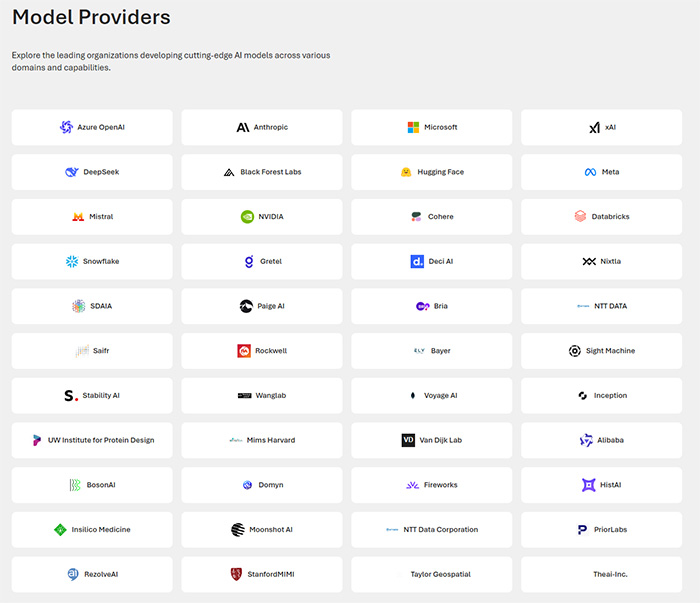
2.1 The Model Catalog
2.1.1 Finding models in the model catalog
2.1.2 Understand generative AI model types
2.1.3 Chat completion and reasoning models
2.1.4 Specialized models
2.1.5 Regional and domain-specific models
2.2 Model Benchmarks
2.2.1 Access model benchmarks
2.2.2 Quality benchmarks
2.2.3 Safety benchmarks
2.2.4 Cost benchmarks
2.2.5 Throughput benchmarks
2.2.6 Use leaderboards and comparison features
2.3 Deploy models to endpoints
2.3.1 Understand deployment types
2.3.2 Deploy a model
2.3.3 Manage deployed models
2.3.4 Test in the playground
2.3.5 Access models programmatically
2.4 Evaluate model performance
2.4.1 Why evaluate models
2.4.2 Manual evaluation approaches
2.4.3 Automated evaluation metrics
2.4.4 Natural language processing metrics
3. Develop a Generative AI chat app with Microsoft Foundry
3.1 Choosing an Endpoint and SDK
3.2 Using the Foundry SDK with the project endpoint
3.2.1 Installing the SDK
3.2.2 Connecting to the project endpoint
3.2.3 Creating a chat client
3.2.4 Using the OpenAI SDK with the Azure OpenAI endpoint
3.2.5 Connecting to the Azure OpenAI endpoint
3.2.6 Choosing between the Foundry SDK and OpenAI SDK
3.3 Generate responses with the Responses API
3.3.1 Generating a simple response
3.3.2 Controlling response generation
3.3.3 Working with Foundry direct models
3.3.4 Creating conversational experiences
3.4 Generate responses with the ChatCompletions API
3.5 An Exercise of Creating a generative AI chat app
3.5.1 Get the endpoint
3.5.2 Create a client application to chat with the model
3.5.3 Get the application files from GitHub
3.5.4 Prepare the application configuration
3.5.5 Use the ChatCompletions API to chat with the model
3.5.6 Use the Responses API to chat with the model
3.5.7 Add conversation tracking
3.5.8 Implement streaming responses
3.5.9 Use the asynchronous API
3.5.10 Summary
4. Develop generative AI apps that use tools
4.1 What are tools?
4.1.1 Specifying tools in the Responses API
4.2 Using the code_interpreter tool
4.2.1 “code_interpreter” common use cases
4.2.2 A simple example
4.2.3 How the code_interpreter tool works
4.2.4 Best practices
4.2.5 Limitations to know about
4.3 Using the web_search tool
4.3.1 “web_search” tool common use cases:
4.3.2 A simple example
4.3.3 How the web_search tool works
4.3.4 Best practices
4.3.5 Limitations to know about
4.4 Using the file_search tool
4.4.1 The “file_search” tool common use cases
4.4.2 A simple example
4.4.3 How the file_search tool works
4.4.4 Best practices
4.4.5 Limitations to know about
4.5 Using the function tool
4.5.1 The “function” tool common use cases
4.5.2 A simple example
4.5.3 How the function tool works
4.5.4 Best practices
4.5.5 Limitations to know about
4.6 Creating a generative AI app that uses tools
4.6.1 Experiment with tools in the playground
4.6.2 Create an app that uses tools
4.6.3 Prepare the application configuration
4.6.4 Write code to implement chat with tools
5. Optimize generative AI model performance with Microsoft Foundry
5.1 Optimize model output with prompt engineering
5.1.1 Understand prompt components
5.1.2 Design effective system messages
5.1.3 Apply prompt patterns
Format template pattern
5.1.4 Few-shot learning pattern
5.1.5 Configure model parameters
5.1.6 When prompt engineering is enough
5.2 Ground your model with Retrieval Augmented Generation (RAG)
5.2.1 Understand grounding
5.2.2 How RAG works
5.2.3 Create embeddings for search
5.2.4 Use Azure AI Search for retrieval
5.2.5 Implement RAG with the Azure AI Foundry SDK
5.2.6 When to use RAG
5.3 Fine-tune a model for consistent behavior
5.3.1 Understand fine-tuning
5.3.2 Explore types of fine-tuning
5.3.3 Prepare training data
5.3.4 Consider the challenges
5.4 Compare and combine optimization strategies
5.4.1 Understand the optimization spectrum
5.4.2 Compare strategies
5.4.3 Combine strategies for better results
5.4.4 Apply a decision framework
5.5 Optimize generative AI model performance
5.5.1 Fine-tune a language model
5.5.2 Deploy a model
5.5.3 Fine-tune a model
5.5.4 Chat with a base model
5.5.5 Review the training file
5.5.6 Test the fine-tuned model
6. Implement a Responsible generative AI solution in Microsoft Foundry
6.1 Map potential harms
6.1.1 Identify potential harms
6.1.2 Prioritize the harms
6.1.3 Test and verify the presence of harms
6.1.4 Document and share details of harms
6.2 Measure potential harms
6.2.1 Manual and automatic testing
6.3 Mitigate potential harms
6.3.1 The model layer
6.3.2 The safety system layer
6.3.3 The system message and grounding layer
6.3.4 The user experience layer
6.4 Manage a responsible generative AI solution
6.4.1 Complete prerelease reviews
6.4.2 Release and operate the solution
6.5 Using Guardrails to prevent the output of harmful content
6.5.1 Chat using the default guardrail
6.5.2 Create and apply a custom guardrail
7. Develop AI agents with Microsoft Foundry and VSCode
7.1 Understanding AI agents and Microsoft Foundry Agent Service
7.1.1 Why AI agents are useful
7.1.2 Examples of AI agent use cases
7.1.3 Security considerations for AI agents
7.1.4 Mitigation strategies
7.1.5 Microsoft Foundry Agent Service overview
7.1.6 Agent types
7.1.7 Key features of Microsoft Foundry Agent Service
7.2 Development approaches
7.2.1 Foundry portal development
7.2.2 Visual Studio Code development
7.2.3 Typical development workflow
7.2.4 Required Azure resources
7.2.5 Optional Azure services
7.2.6 Choosing your development approach
7.3 Build your first agent in Microsoft Foundry
7.3.1 Configuring agent instructions and properties
7.3.2 Testing your agent in the portal
7.3.3 Adding basic tools
7.3.4 Deploying your agent
7.4 Configuring VSCode for agent development
7.4.1 Installing and configuring the extension
7.4.2 Connecting to Azure
7.4.3 Preparing for agent development
7.4.4 Working with agents in VS Code
7.5 Configure and manage agents in Visual Studio Code
7.5.1 Configuring agent properties
7.5.2 Essential configuration options
7.5.3 Model configuration options
7.5.4 Understanding the agent YAML structure
7.5.5 Best practices for agent configuration
7.6 Extend agent capabilities with tools
7.6.1 Understanding agent tools
7.6.2 Built-in tools overview
7.6.3 Code Interpreter
7.6.4 File Search
7.6.5 Bing Web Search
7.6.6 Azure AI Search
7.6.7 OpenAPI tools
7.6.8 Additional built-in tools
7.6.9 Adding tools in Visual Studio Code
7.6.10 Adding tools through YAML
7.7 Model Context Protocol (MCP) servers
7.7.1 Types of MCP servers
7.7.2 Benefits of MCP servers
7.7.3 Using MCP servers in VS Code
7.7.4 Tool configuration best practices
7.8 Test, deploy, and integrate agents
7.8.1 Testing strategies for agents
7.8.2 Deploying agents to your project
7.8.3 Publishing agents to an endpoint
7.8.4 The Agent Application endpoint
7.8.5 Authentication and identity
7.8.6 Verifying the endpoint
7.8.7 Updating published agents
7.8.8 Generating integration code
7.8.9 Integration patterns
7.8.10 Production considerations
7.9 Build AI agents with portal and VS Code Exercise
7.9.1 Create a Microsoft Foundry Project
7.9.2 Configure your agent with instructions and grounding data
7.9.3 Test your agent
7.9.4 Interact with your agent using VS Code
7.9.5 Test your agent in VS Code
7.9.6 Create a client application to interact with your agent
7.9.7 Configure environment and run the application
7.9.8 Test the client application
8. Integrating Custom Tools to Agent
8.1 Why use custom tools?
8.1.1 Common scenarios for custom tools in agents
8.1.2 Customer support automation
8.1.3 Inventory management
8.1.4 Healthcare appointment scheduling
8.1.5 IT Helpdesk support
8.1.6 E-learning and training
8.2 Options for implementing custom tools
8.2.1 Custom tool options available in Microsoft Foundry Agent Service
8.3 How to integrate custom tools
8.3.1 Function Calling
8.3.2 Azure Functions
8.3.3 OpenAPI Specification
8.4 Build an agent with Custom Tools
8.4.1 Create a Foundry project with the Foundry Toolkit for VS Code extension
8.4.2 Deploy a model
8.4.3 Clone the starter code repository
8.4.4 Create a function for the agent to use
8.4.5 Connect to the Foundry project
8.4.6 Define the function tools
8.4.7 Create the agent that uses the function tools
8.4.8 Send a message to the agent and process the response
8.4.9 Process function calls and display the agent’s response
8.4.10 Run the agent application
9. Integrate MCP Tools with Azure AI Agents
9.1 Understanding MCP tool discovery
9.1.1 Advantages of the Model Context Protocol for AI agents
9.1.2 What is dynamic tool discovery?
9.1.3 How does MCP enable dynamic tool discovery?
9.1.4 Why use dynamic tool discovery with MCP?
9.2 Integrate agent tools using an MCP server and client
9.2.1 What is the MCP Server?
9.2.2 What is the MCP Client?
9.2.3 Register tools with an Azure AI Agent
9.3 Using Azure AI agents with MCP servers
9.3.1 Integrating remote MCP servers
9.3.2 Invoking tools
9.4 Connect MCP tools to Azure AI Agents Exercise
9.4.1 Deploy a model
9.4.2 Clone the starter code repository
9.4.3 Connect an Azure AI Agent to a remote MCP server
9.4.4 Test the connection to the remote MCP server
9.4.5 Create an MCP server with custom tools
9.4.6 Implement an MCP client to connect to the custom MCP server
9.4.7 Connect the MCP tools to your agent
9.4.8 Test the custom MCP tools with your agent
10. Knowledge-enhanced AI agents with Foundry IQ
10.1 Understanding Retrieval Augmented Generation (RAG) for agents
10.1.1 Simple AI agent limitations
10.1.2 How RAG solves these problems
10.2 Foundry IQ
10.2.1 What is Foundry IQ?
10.2.2 How knowledge bases organize information
10.2.3 Connecting data sources
10.2.4 Built-in retrieval intelligence
10.2.5 Connecting agents to knowledge
10.2.6 The shared knowledge advantage
10.3 Configure data sources for knowledge bases
10.3.1 Azure AI Search Index
10.3.2 Azure Blob Storage
10.3.3 Web
10.3.4 Microsoft SharePoint options
10.3.5 Microsoft OneLake
10.3.6 Choose the right data source
10.4 Configure retrieval with Foundry IQ
10.4.1 The retrieval behavior problem
10.4.2 Controlling retrieval with instructions
10.4.3 Writing effective retrieval instructions
10.4.4 Testing retrieval behavior
10.4.5 Evaluating response quality
10.4.6 Retrieval strategies for different agent types
10.4.7 Moving from testing to production
10.5 Integrate an AI agent with Foundry IQ Exercise
10.5.1 Create a Foundry project
10.5.2 Create an agent
10.5.3 Configure your data and Foundry IQ
10.5.4 Test the Agent in the playground
10.5.5 Configure the agent to require approval for tool calls
10.5.6 Connect to your agent from an app
10.5.7 Configure the application settings
10.5.8 Complete the agent client code
10.5.9 Test the Integration
10.5.10 Review the results
10.5.11 Summary
11. Foundry Agent-Driven Workflows
11.1 Understanding Workflows
11.2 Identify Workflow Patterns
12. Microsoft Agent Framework
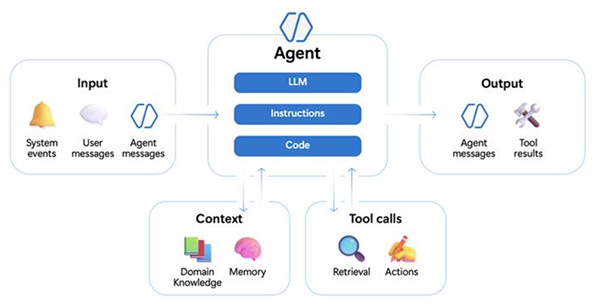
12.1 Understanding Microsoft Agent Framework AI agents
12.1.1 Architecture and key features
12.1.2 What agents can do
12.1.3 Using the Microsoft Agent Framework with AI Foundry
12.1.4 Why Foundry is the recommended provider
12.1.5 Provider matrix
12.2 Create an Azure AI agent with Microsoft Agent Framework
12.2.1 Configuring a Foundry agent
12.2.2 Multi-turn conversations
12.2.3 Nonstreaming vs. streaming responses
12.3 Tools for Microsoft Agent Framework
12.3.1 Service-provided tools
12.3.2 Custom function tools
12.3.3 Adding multiple tools
12.3.4 Tool approval
12.3.5 Using an agent as a tool
12.3.6 Best practices for custom tools
12.4 Develop an Azure AI agent with the Microsoft Agent Framework SDK
12.4.1 Deploy a model
12.4.2 Clone the starter code repository
12.4.3 Create an agent with a custom tool
12.4.4 Test the application
13. Orchestrate a multi-agent solution using the Microsoft Agent Framework
13.1 Understanding Orchestration with Microsoft Agent Framework
13.1.1 Core Concepts
13.2 Introduction to Agent Orchestration
13.2.1 Why multi-agent orchestration matters
13.2.2 Understand workflows in the Microsoft Agent Framework
13.2.3 Supported orchestration patterns
13.2.4 A unified orchestration workflow
13.3 Concurrent Orchestration
13.3.1 When to use concurrent orchestration
13.3.2 When to avoid concurrent orchestration
13.3.3 Implement concurrent orchestration
13.4 Sequential Orchestration
13.4.1 When to use sequential orchestration
13.4.2 When to avoid sequential orchestration
13.4.3 Implement sequential orchestration
13.5 Group Chat Orchestration
13.5.1 When to use group chat orchestration
13.5.2 When to avoid group chat orchestration
13.5.3 Maker-checker loops
13.5.4 Implement group chat orchestration
13.5.5 Customizing the group chat manager
13.5.6 Group chat manager call order
13.6 Handoff Orchestration
13.6.1 When to use handoff orchestration
13.6.2 When to avoid handoff orchestration
13.6.3 Implementing handoff orchestration
13.7 Magentic orchestration
13.7.1 When to use Magentic orchestration
13.7.2 When to avoid Magentic orchestration
13.8 Implementing Magentic orchestration
13.9 Developing Multi-Agent Solution Exercise
13.9.1 Lab files repository
13.9.2 Create AI agents
13.9.3 Create a sequential orchestration
13.9.4 Test the application
13.9.5 Chapter summary
14. A2A protocol
14.1 Define an A2A agent
14.1.1 Advantages of the Agent-to-Agent (A2A) protocol
14.1.2 Agent Skills
14.1.3 Agent Card
14.1.4 Putting them all together
14.2 Agent Executor
14.2.1 Understand the Agent Executor
14.2.2 Implement the interface
14.2.3 Request handling flow
14.3 Hosting an A2A server
14.3.1 Core components of the agent server
14.3.2 Set up the A2A agent server
14.4 Connecting to A2A agent
14.4.1 Connect to your agent server
14.4.2 Send requests to the agent
14.4.3 Handle the agent response
14.4.4 Interacting with the agent
14.5 Connect to remote Azure AI Agents with the A2A protocol Exercise
14.5.1 Clone the starter code repository
14.5.2 Create a discoverable agent
14.5.3 Enable messages between the agents
14.5.4 Test the application
15. Analyze text with Azure Language in Foundry Tools
15.1 Azure Language in Microsoft Foundry Tools
15.1.1 Using a Microsoft Foundry resource for text analysis
15.1.2 Authentication
15.2 Detect language
15.3 Extracting Entities
15.4 Extracting personally identifiable information (PII)
15.5 Analyze Text Exercise
15.5.1 Get the application files from GitHub
15.5.2 Configure your application
15.5.3 Add code to connect to your Azure AI Language resource
15.5.4 Add code to detect language
15.5.5 Add code to extract entities
15.5.6 Add code to redact PII
16. Azure Language MCP server
16.1 Understand the Azure Language MCP server
16.1.1 MCP
16.1.2 Azure Language MCP server capabilities
16.1.3 How the agent selects tools
16.1.4 MCP server endpoint
16.2 Procedures for connecting and using the Language MCP server with an agent
16.2.1 Create a Foundry project and agent
16.2.2 Connect the Azure Language MCP server
16.2.3 Update agent instructions
16.2.4 Test in the agent playground
16.2.5 Build a client application
16.2.6 Connect the MCP server in code
16.2.7 Tool selection with multi-task prompts
16.3 Develop a text analysis agent exercise
16.3.1 Create an agent
16.3.2 Create an Azure Language in Foundry Tools connection
16.3.3 Test the Azure Language tool in the playground
16.3.4 Configure tool approval
16.3.5 Create a client application
16.3.6 Configure the application
16.3.7 Implement application code
16.3.8 Test the client application
16.3.9 View tool details
17. Develop a Speech-capable generative AI application
17.1 Choosing a speech-capable model
17.2 Transcribe speech
17.2.1 Using a speech-to-text model
17.3 Synthesize speech
17.3.1 Using a text-to-speech model
17.4 Using speech-capable generative AI models
17.4.1 Create a Microsoft Foundry project
17.4.2 Deploy a speech-generation model
17.4.3 Deploy a speech-recognition model
17.4.4 Get the application files from GitHub
17.4.5 Create a speech-generation app
17.4.6 Configure your application
17.4.7 Write code to use the model for speech-generation
17.4.8 Run the application
17.4.9 Create a speech-transcription app
17.4.10 Configure your application
17.4.11 Write code to use the model for speech-transcription
17.4.12 Run the application
18. Speech-enabled apps with Azure Speech in Microsoft Foundry Tools
18.1 Azure Speech in Foundry Tools
18.1.1 Using Azure Speech in a Microsoft Foundry resource
18.1.2 Creating a SpeechConfig
18.2 Use the Speech to Text API
18.2.1 Example - Transcribing an audio file
18.3 Use the Text to Speech API
18.4 Configure audio format and voices
18.4.1 Audio format
18.4.2 Voices
18.5 Speech Synthesis Markup Language(SSML)
18.6 Recognize and synthesize speech exercise
18.6.1 Get the application files from GitHub
18.6.2 Configure your application
18.6.3 Add code to synthesize speech
18.6.4 Add code to recognize speech
19. Developing Speech Agent with the Azure Speech MCP server
19.1 Understanding Azure Speech MCP server
19.1.1 Azure Speech MCP server capabilities
19.1.2 Storage requirements
19.1.3 Prerequisites
19.1.4 Security considerations
19.2 Connecting and using the Speech MCP server with an agent
19.2.1 Set up Azure Blob Storage
19.2.2 Create a Foundry project and agent
19.2.3 Connect the Azure Speech MCP server
19.2.4 Test in the agent playground
19.2.5 Customizing speech output
19.2.6 Build a client application
19.2.7 Connect the MCP server in code
19.3 Using Azure Speech in an agent exercise
19.3.1 Create an Azure storage account
19.3.2 Create an agent
19.3.3 Create an Azure Speech in Foundry Tools connection
19.3.4 Test the Azure Speech tool in the playground
19.3.5 Create a client application
19.3.6 Configure the application
19.3.7 Implement application code
19.3.8 Test the client application
20. Azure Speech Voice Live Agent
20.1 Explore the Azure Voice Live API
20.1.1 Key features of the Voice Live API
20.1.2 Connect to the Voice Live API
20.1.3 WebSocket endpoint
20.1.4 Voice Live API events
20.1.5 Configure session settings for the Voice live API
20.1.6 Implement real-time audio processing with the Voice live API
20.1.7 Integrate avatar streaming using the Voice live API
20.2 AI Voice Live client library for Python
20.2.1 Implement authentication
20.2.2 Handling events
20.2.3 Minimal example
20.3 Creating a Voice Live agent
20.3.1 Create a voice agent in the agent playground
20.3.2 Create a voice agent using code
20.3.3 Use your agent in a client application
20.4 Developing a Voice Live agent exercise
20.4.1 Create an agent
20.4.2 Configure Azure Speech Voice Live
20.4.3 Use speech to interact with the agent
20.4.4 Create a client application
20.4.5 Configure the application
20.4.6 Implement application code
20.4.7 Run the application
21. Translate text and speech with Microsoft Foundry Tools
21.1 Translation in Microsoft Foundry
21.2 Translate text
21.2.1 Use Azure Translator in the Microsoft Foundry portal
21.2.2 Use Azure Translator in application code
21.2.3 Connect to an Azure Translator resource
21.2.4 Determine available languages
21.2.5 Translate text
21.2.6 Transliterate text
21.3 Translate speech
21.3.1 Use Azure Speech translation in application code
21.3.2 Connect to an Azure Speech resource
21.3.3 Configure translation languages and input
21.3.4 Translate speech to text
21.3.5 Synthesize translations as speech
21.4 Translate text and speech exercise
21.4.1 Explore Azure Translator in Foundry Tools in the portal
21.4.2 Get application files from GitHub
21.4.3 Create a text translation application
21.4.4 Configure your text translation application
21.4.5 Add code to translate text
21.4.6 Create a speech translation application
21.4.7 Add code to translate speech
22. Vision-Enabled Generative AI application
22.1 Vision-capable model in the Microsoft Foundry portal
22.2 Develop a vision-based chat app
22.2.1 Submit an image-based prompt using the Responses API
22.2.2 Submit an image-based prompt using the ChatCompletions API
22.3 Developing a vision-enabled chat app exercise
22.3.1 Deploy a model
22.3.2 Test the model in the playground
22.3.3 Create a client application
22.3.4 Prepare the application configuration
22.3.5 Write code to get an OpenAI chat client for your model
22.3.6 Write code to submit a URL-based image prompt
22.3.7 Sign into Azure and run the app
22.3.8 Modify the code to upload a local image file
23. Generate images with AI
23.1 Image-generation models
23.2 Create a client application that uses an image generation model
23.2.1 Deploy a model
23.2.2 Test the model in the playground
23.2.3 Create a client application
23.2.4 Prepare the application configuration
23.2.5 Write code to connect to your project and chat with your model
23.2.6 Run the client application
24. Generate videos with Microsoft Foundry
24.1 Deploy the Sora 2 model
24.2 Generate video from a prompt
24.2.1 Video generation parameters
24.2.2 Test video generation in the playground
24.2.3 Writing effective prompts
24.2.4 Prompt anatomy
24.2.5 Weak vs. strong prompts
24.2.6 Using reference images
24.2.7 Remixing existing videos
24.2.8 Tips for better results
24.3 Generate video in Python
24.3.1 Generate video from a reference image
24.3.2 Remix an existing video
24.3.3 Key considerations
24.4 Generate video with Sora 2 in Microsoft Foundry exercise
24.4.1 Understand responsible AI considerations
24.4.2 Deploy a model
24.4.3 Test the model in the playground
24.4.4 Create a video generation application
24.4.5 Prepare the application configuration
24.4.6 Write code to generate videos from an image reference
24.4.7 Sign into Azure and run the app
25. Analyze images with Content Understanding
25.1 Content Understanding components
25.1.1 Analyzers
25.1.2 Use cases
25.1.3 Content restrictions
25.2 Analyze images with Content Understanding
25.2.1 Supported image formats
25.2.2 Prebuilt image analyzers
25.2.3 Define a field schema for images
25.2.4 Analyze an image
25.2.5 Use confidence scores
25.3 Analyze images with Content Understanding exercise
25.3.1 Create an Azure storage account
25.3.2 Create an image analyzer in Azure Content Understanding
25.3.3 Create an image analyzer application
25.3.4 Prepare the application configuration
25.3.5 Write code to analyze images and generate descriptions
25.3.6 Test the app
26. Multimodal Analysis solution with Azure Content Understanding
26.1 Multimodal content analysis
26.1.1 Documents and forms
26.1.2 Images
26.1.3 Audio
26.1.4 Video
26.2 Content Understanding Analyzer
26.2.1 Creating an analyzer with Content Understanding Studio
26.2.2 Creating a Content Understanding project
26.2.3 Defining a schema
26.2.4 Testing
26.2.5 Building an analyzer
26.3 Content Understanding API
26.3.1 Using the API to analyze content
26.4 Extract information from multimodal content exercise
26.4.1 Create a Microsoft Foundry resource and project
26.4.2 Download content
26.4.3 Try prebuilt analyzers in Microsoft Foundry
26.4.4 Use the Layout analyzer in the playground
26.4.5 Set up Content Understanding Studio for custom analyzers
26.4.6 Extract information from invoice documents
26.4.7 Build and test an analyzer for invoices
26.4.8 Extract information from a slide image
26.4.9 Define a schema for image analysis
26.4.10 Build and test an analyzer
26.4.11 Extract information from a voicemail audio recording
26.4.12 Build and test an analyzer
26.4.13 Extract information from a video conference recording
26.4.14 Build and test an analyzer
27. Azure Content Understanding client application
27.1 Prepare to use the AI Content Understanding API
27.1.1 Installing the Python SDK
27.2 Creating a Content Understanding analyzer with Python SDK
27.2.1 Defining a schema for an analyzer
27.2.2 Using the Python SDK to create an analyzer
27.2.3 Using the REST API to create an analyzer
27.3 Analyze content with Python SDK
27.3.1 Using the Python SDK
27.3.2 Using the REST API
27.3.3 Processing analysis results
27.4 Develop a Content Understanding client application exercise
27.4.1 Create a Microsoft Foundry resource and project
27.4.2 Configure Content Understanding models and connection
27.4.3 Prepare the development environment
27.4.4 Create an analyzer with the Python SDK
27.4.5 Analyze content using the Python SDK
28. Extract data with Azure Document Intelligence
28.1 Azure Document Intelligence
28.1.1 Document Intelligence service components
28.1.2 Access Document Intelligence services
28.1.3 Create a Document Intelligence resource
28.1.4 Input requirements
28.2 Document Intelligence Studio
28.2.1 Studio capabilities
28.2.2 Analyze documents with prebuilt models
28.2.3 Build custom model projects
28.2.4 Add-on capabilities
28.3 Prebuilt models
28.3.1 Document analysis models
28.3.2 Read model
28.3.3 Layout model
28.3.4 Prebuilt models for specific document types
28.3.5 Features of prebuilt models
28.3.6 When to use prebuilt vs. custom models
28.4 Custom models
28.4.1 Custom model types
28.4.2 Choose between template and neural models
28.4.3 Custom classifiers
28.4.4 Train a custom model
28.4.5 Using a custom model
28.4.6 Composed models
28.5 Analyze documents with Document Intelligence exercise
28.5.1 Create a Document Intelligence resource
28.5.2 Use the Read model in the portal
28.5.3 Analyze an invoice with a prebuilt model using the Python SDK
28.5.4 Add code to analyze an invoice
28.5.5 Train and test a custom model
28.5.6 Train the model in Document Intelligence Studio
28.5.7 Test the custom model with the Python SDK
29. Knowledge Mining solution with Azure AI Search
29.1 Extract data with an indexer
29.1.1 How documents are constructed during indexing
29.2 Enrich extracted data with AI skills
29.2.1 Built-in skills
29.2.2 Custom skills
29.3 Searching an index
29.3.1 Full-text search
29.3.2 Filtering results
29.3.3 Filtering with facets
29.3.4 Sorting results
29.4 Persist extracted information in a Knowledge store
29.5 Create a knowledge mining solution
29.5.1 Create Azure AI Search resources
29.5.2 Create a storage account
29.5.3 Upload documents to Azure Storage
29.5.4 Create and run an indexer
29.5.5 Search the index
29.5.6 Create a search client application
|














 繳付學費,過程簡便!