SQL Training Course (提供 7x24 實習器材) Training 課程
  Facebook: SQL Training Course (提供 7x24 實習器材) Training 課程
 
SQL Training Course (提供 7x24 實習器材) Training 課程
SQL Training Course (提供 7x24 實習器材) Training 課程 SQL Training Course (提供 7x24 實習器材) Training 課程 SQL Training Course (提供 7x24 實習器材) Training 課程 SQL Training Course (提供 7x24 實習器材) Training 課程 SQL Training Course (提供 7x24 實習器材) Training 課程 SQL Training Course (提供 7x24 實習器材) Training 課程 SQL Training Course (提供 7x24 實習器材) Training 課程 SQL Training Course (提供 7x24 實習器材) Training 課程 SQL Training Course (提供 7x24 實習器材) Training 課程 SQL Training Course (提供 7x24 實習器材) Training 課程 SQL Training Course (提供 7x24 實習器材) Training 課程 SQL Training Course (提供 7x24 實習器材) Training 課程  
SQL Training Course (提供 7x24 實習器材) Training 課程 SQL Training Course (提供 7x24 實習器材) Training 課程

想定期知道最新課程及優惠嗎?
免費訂閱本中心的課程通訊!

課堂錄影隨時睇 10 大優點之導師解答:您可於觀看某一課堂視像後提出相關問題,課程導師會樂意為學員以單對單的形式解答!

Oracle AI Database SQL Associate 認證課程
課程簡稱:SQL Training Course (提供 7x24 實習器材)

本課程可給你隨時隨地以任何瀏覽器享用一套專屬於你的導師器材,來進行全個課程的所有實習!詳情


  • 課程時間
  • 課程簡介
  • 課程特點
  • 認證要求
  • 考試須知
  • 課程內容

地區 地址 電話 教育局註冊編號
旺角 九龍旺角亞皆老街 109 號,皆旺商業大廈 18 樓 1802 - 1807 室 2332-6544 533459
觀塘 九龍觀塘成業街 7 號寧晉中心 12 樓 G2 室 3563-8425 588571
北角 香港北角馬寶道 41-47 號華寶商業大廈 3 樓 01-02 號舖 3580-1893 591262
沙田 新界沙田石門安群街 3 號京瑞廣場 1 期 10 樓 M 室 2151-9360 604488
屯門 新界屯門屯喜路 2 號屯門柏麗廣場 17 樓 1708 室 3523-1560 592552
注意! 客戶必須查問報讀學校的教育局註冊編號,以確認該校為註冊學校,以免蒙受不必要的損失!


Oracle(甲骨文)於紐約證券交易所(NYSE)掛牌交易,是全球領先的雲端運算與數據庫管理軟體巨頭。

受惠於 2025 年 AI 需求大爆發,Oracle 的雲端基礎設施業務強勁增長,帶動市值大幅攀升。2025 年 9 月,其市值一度突破 9,000 億美元(約 70,200 億港元),創下歷史新高;全年平均市值維持在 5,700 億美元(約 44,460 億港元)水平。

在財務表現方面,Oracle 2025 財務年度的總營業額達 664 億美元,純利則達 241 億美元,展現出顯著的盈利增長趨勢。

Oracle 推出的數據庫軟件 Oracle AI Database 26ai 有強大的穩定性和擴展能力,所以全球的各大企業、銀行、大學和政府機構,無一不採用 Oracle 的產品。而本課程將教授 SQL Statement 的編寫。

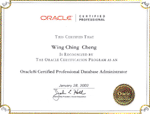
為了能證明你有專業水準來修改、插入及刪除 Oracle 數據庫內的記錄及核實你對資料定義語言 (Data Definition Language)、資料控制語言 (Data Control Language)、優化器、表格與索引、資料建模和正規化的知識,Oracle 便推出 Oracle AI Database SQL Associate 國際認可考試。

而本課程籌備多時,精心編排,由上堂、溫習、實習、考試研習、做試題至最後考試,均為你度身訂造,作出有系統的編排。務求真正教識你,又令你考試及格。
Oracle


課程名稱: Oracle AI Database SQL Associate 認證課程
- 簡稱:SQL Training Course (提供 7x24 實習器材)
課程時數: 合共 15 小時 (共 5 堂),共 1 科
適合人士: 初學 SQL Statement 人士; 或
初學數據庫人士
授課語言: 以廣東話為主,輔以英語
課程筆記: 本中心導師親自編寫英文為主筆記,而部份英文字附有中文對照

1.模擬考試題目: 本中心為學員提供模擬考試題目,每條考試題目均附有標準答案。
2.導師親自編寫筆記: 由本中心導師親自編寫筆記,絕對適合考試及實際管理之用,令你無須「死鋤」如字典般厚及不適合香港讀書格調的書本。
3. 隨時隨地以任何瀏覽器享用一套專屬於你的導師器材,來進行全個課程的所有實習: 隨時:由課程開始日起計的 8 星期內,每星期 7 日,每日 24 小時。

隨地:於本中心上課時的課室、學員家中、甚至是離港旅遊時的住所等等地方。

任何瀏覽器:不論是 Windows PC、Macbook、iPad、Android等等,只要有任何的一個網頁瀏覽器。

一套專屬於你的導師器材,來進行全個課程的所有實習:學員透過上網接駁至雲端伺服器,便能個人獨享一套器材,而這套器材等同於導師教學時所用的器材,故學員能依照課程筆記來進行全個課程的所有實習。

而學員於這 8 星期內的實習進度會被儲存起,以方便學員於下一次做實習時能緊接之前的進度。另外,學員亦可自行在實習途中隨時使用快照 (Snapshot),以便日後快速還原來重做實習。

故此,本課程無須要學員花時間及金錢來添置器材或自行租用雲端服務。

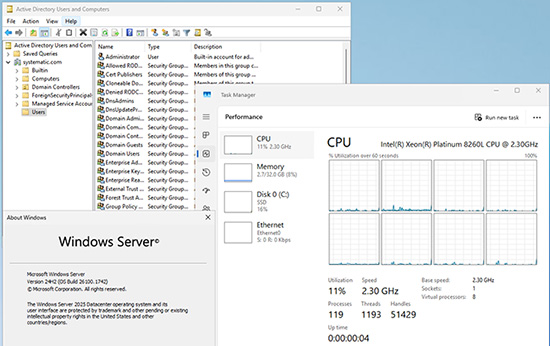
而學員透過上網所接駁的雲端伺服器,其規格如下:

  • Intel Xeon Processor 8 核芯
  • 32GB RAM
  • 256GB 企業級 SSD 固態硬碟儲存空間

以上的雲端伺服器硬件,若是學員自行租用雲端服務的話,其租用費已差不多是本課程的學費了。

註: 導師器材會有 1 部 Oracle AI Database Server, 1 套 SQL Developer 及 SQL*Plus

4. 免費重讀: 傳統課堂學員可於課程結束後三個月內免費重看課堂錄影。

Oracle 已公佈考生必須通過以下 1 個 Oracle Database 相關科目的考試,才可獲發 Oracle AI Database SQL Associate 國際認可證書:


考試編號 科目名稱
1Z0-071 Oracle AI Database SQL Associate


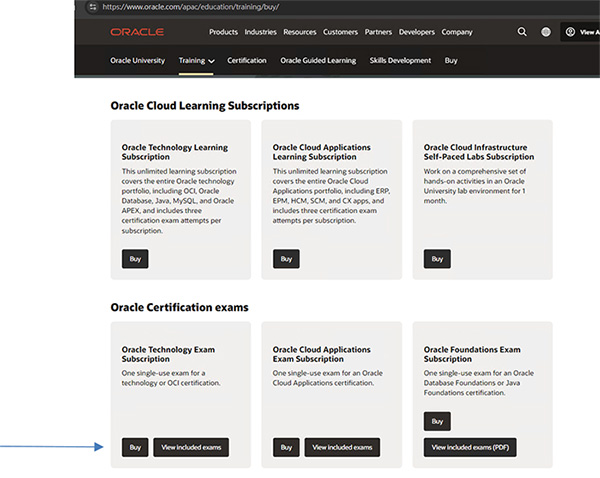
Oracle 已公佈學員必需親自前往 https://www.oracle.com/apac/education/training/buy/ 購買以下 1 個科目的 "Oracle Technology Exam Subscription" 並由 Oracle 親自向您提供考試服務。

考試編號 1Z0-171 (Oracle AI Database SQL Associate) 考試費為 USD $245

學員可於家中上網應考,考試題目由 Oracle 傳送到你要應考的電腦,考試時以電腦作答。所有考試題目均為英文,而大多數的考試題目為選擇題。

考試合格後會收到來自 Oracle 的作實電郵,並進入該電郵內的連結,登入 https://certview.oracle.com 下載您的證書。

考試不合格便可於 5 日後重新報考,但 12 個月內最多只可以考 4 次。欲知道作答時間、題目總數、合格分數等詳細考試資料,可瀏覽本中心網頁"各科考試分數資料"。


課程名稱:Oracle AI Database SQL Associate 認證課程
- 簡稱:SQL Training Course (提供 7x24 實習器材)

Relational Database Concepts

  • Explain the theoretical and physical aspects of a relational database
  • Describe how to relate clauses in SQL Select Statement to Components of an ERD
  • Describe the relationship between a database and SQL
  • Retrieving Data using the SQL SELECT Statement and Restricting and Sorting Data

Demonstrate how to use column aliases

  • Describe using The SQL SELECT statement
  • Apply knowledge of how to use the concatenation operator, literal character strings, alternative quote operator, and the DISTINCT keyword
  • Calculate output using Arithmetic expressions and NULL values in the SELECT statement
  • Demonstrate how to use rules of precedence for operators in an expression
  • Identify how to limit rows returned in a SQL statement
  • Recognize how to use Substitution Variables
  • Describe using the DEFINE and VERIFY commands
  • Utilize concepts to sort data

Using Functions

  • Apply character functions to manipulate strings in SELECT and WHERE clauses
  • Show how to use arithmetic with date data
  • Use the ROUND, TRUNC and MOD functions
  • Use DATE functions
  • Apply the NVL, NULLIF, and COALESCE functions to data
  • Explain implicit and explicit data type conversion
  • Use the TO_CHAR, TO_NUMBER, and TO_DATE conversion functions
  • Describe nesting multiple functions
  • Show restricting group results
  • Explain creating groups of data and using group functions

Displaying Data from Multiple Tables

  • Use SELF-JOINS
  • Use various types of joins
  • Use NON EQUIJOINS
  • Use OUTER joins
  • Show understanding of using CARTESIAN PRODUCTS

Using Subqueries to Solve Queries

  • Use single row subqueries
  • Use multiple row subqueries
  • Show how to update and delete rows using correlated subqueries

Using SET Operators

  • Demonstrate matching the SELECT statements
  • Use the ORDER BY clause in set operations
  • Use the INTERSECT, MINUS, UNION and UNION ALL operators

Managing Tables using DML statements

  • Apply managing database transactions and controlling transactions
  • Execute Insert, Update and Delete operations
  • Execute multi table Inserts and Merge statements

Managing Indexes Synonyms and Sequences

  • Manage indexes
  • Manage synonyms
  • Manage sequences

Use DDL to manage tables and their relationships

  • Describe working with tables
  • Describe working with columns and data types
  • Use CREATE TABLE statements
  • Demonstrate dropping columns and setting column UNUSED
  • Explain the TRUNCATE TABLE statement
  • Create and use temporary tables
  • Create and use external tables
  • Apply how to manage constraints
  • Explain managing views

Controlling User Access

  • Contrast system privileges and object privileges
  • Apply granting privileges on tables
  • Demonstrate how to grant privileges and create roles

Managing Objects with Data Dictionary Views and Data in Different Time Zones

  • Use data dictionary views
  • Use CURRENT_DATE,CURRENT_TIMESTAMP,and LOCALTIMESTAMP
  • Explain how to use the INTERVAL data types


更多綜合課程