 付款。
付款。
CompTIA (The Computing Technology Industry Association) 於 1982 年成立,其推行的 Tech+ 認證是一套中立的 (Vendor Neutral) 國際認證,目的是要確認您對資訊科技擁有廣泛的基礎理解。
CompTIA Tech+: 您人生的第 1 張國際認可I.T.認證!
為何要考取 CompTIA Tech+ 認證?
- 全球超過 250 萬人持有 CompTIA 認證,反映其受歡迎程度。
- 因其中立的特性及獨特的內容設計,CompTIA Tech+ 是唯一被公認的職前認證 (Pre-Career Certification),可以幫助您確定是否具有對資訊科技的天賦和興趣。
- CompTIA 領先而中立的認證,會被全球各地的國際級機構重視,並被設定為必要的入職條件。例如 Dell、HP、Ricoh、Sharp、Xerox 及 Apple Consultant Network 技術人員便必需持有 CompTIA 的各項認證。
- 為進修 CompTIA A+ / Network+ / Server+ / Cloud+ / Security+、Cisco CCNA、Amazon AWS CCP、Oracle OCP、Microsoft Credentials 等等更高級的商業認證作準備。
- 基礎的資訊科技知識:它提供了對資訊科技概念和術語的基礎理解。
- 職業探索:它幫助您探索資訊科技領域各方面,讓您能夠確定感興趣的領域。
- 提高就業能力:即使在初級資訊科技支援職位中,它也可以提高您進入資訊科技各領域的就業機會。
- 技能發展:CompTIA Tech+ 認證及課程涵蓋了資訊科技基礎技能,包括硬件、軟件、安全性和網路,有助於您發展實用技能,並提高了您的資訊科技技能和理解,這些綜合的基礎於各行各業都有很高的價值。
- 認證先決條件:某些僱主或組織可能要求 CompTIA Tech+ 認證作為特定職位的先決條件。
- 個人成長:它為您在日常生活中的使用技術方面建立了信心和能力。
誰會從 CompTIA Tech+ 認證及課程受益?
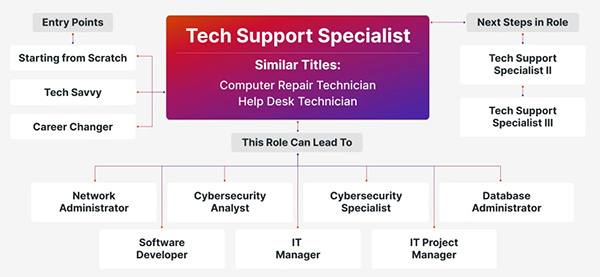
- 考慮在資訊科技領域開展職業生涯的人士及事業轉型者。
- 在需要對資訊科技有廣泛了解的各行各業在職人士。
- 希望提升工作表現、增強資訊科技技能並減少對支援人員的依賴的文職、銷售和營運人員。
而您將會於本中心舉辦的 CompTIA Tech+ 課程學到那些領域的資訊科技概念與技能?
- 科技概念與術語
- 計算基礎:輸入、處理、輸出及儲存基礎。
- 記數系統:二進位、八進位、十進位及十六進位系統。
- 度量單位:儲存 (Bit、Byte、KB、GB、TB)、速度 (MHz、GHz),以及傳輸率 (bps、Mbps、Gbps)。
- 故障排除方法:識別問題、測試理論、實施解決方案、核實故障排除及記錄發現。
- 基礎設施
- 計算裝置:智慧型手機、平板電腦、筆記型電腦、伺服器、IoT 裝置及遊戲主機。
- 內部組件:主機板、處理器、記憶體、儲存 (HDD、SSD、NVMe)、NIC及 GPU。
- 儲存類型:揮發性 vs. 非揮發性、本地網路及雲端儲存。
- 周邊設備設定:列印機、掃描器、顯示器及驅動程式安裝。
- 裝置介面:USB、HDMI、Ethernet、Bluetooth及 NFC。
- 虛擬化與雲端:Hypervisors、SaaS、PaaS、IaaS、混合及內部部署模型。
- 網路基礎:LAN vs. WAN、IP/MAC 位址、路由器、交換器及防火牆。
- 無線網路:802.11標準、速度及干擾因素。
- 應用程式與軟體
- 作業系統:行動、桌面、伺服器、嵌入式系統。
- 作業系統組件:檔案系統 (NTFS、FAT32)、GUI介面、指令模式、公用程式及驅動程式。
- 軟體類型:生產力工具、協作應用程式、網頁瀏覽器及遠端支援。
- 網頁瀏覽器功能:無痕瀏覽、附加元件、密碼管理及快取清除。
- 人工智能:聊天機器人、AI助手及生成式 AI的基礎使用知識。
- 軟體開發概念
- 程式語言:解譯式、編譯式、腳本、標記及組合語言。
- 資料類型:字元、字串、整數、浮點數及布林值。
- 程式設計概念:變數、常數、陣列、函數及物件。
- 組織技巧:偽碼、流程圖、物件導向方法、分支及迴圈。
- 資料與資料庫基礎
- 資料價值:資料驅動決策、報告及貨幣化。
- 資料庫概念:關聯式 vs. 非關聯式、表格、列、欄位、主鍵/外鍵。
- 資料庫使用:查詢、報告、可擴展性、雲端 vs. 本地儲存。
- 備份概念:檔案與系統備份、本地 vs. 雲端儲存。
- 安全性
- 安全性概念:機密性、完整性、可用性、認證及授權。
- 裝置安全性:防惡意軟體、防火牆、補丁、物理安全及安全瀏覽。
- 密碼實務:長度、複雜度、隱私、重複使用及密碼管理軟體。
- 加密:靜止資料、傳輸中資料、HTTPS、VPN及行動裝置。
| 課程名稱: |
CompTIA Tech+ 國際認可證書課程 - 簡稱:CompTIA Tech+ Training Course |
| 課程時數: | 合共 24 小時 (共 8 堂),共 1 科 |
| 適合人士: | 有志投身或轉職資訊科技界人士 |
| 授課語言: | 以廣東話為主,輔以英語 |
| 課程筆記: | 本中心導師親自編寫英文為主筆記,而部份英文字附有中文對照。 |
| 1. 模擬考試題目: | 本中心為學員提供模擬考試題目,每條考試題目均附有標準答案。 |
| 2. 時數適中: | 本中心的 CompTIA Tech+ 國際認可證書課程時數適中,有 24 小時。令學員能真正了解及掌握課程內容,而又能於 2 個月內考獲 CompTIA Tech+ 國際認可證書。 |
| 3. Larry Chan 親自教授: | Larry 具備了 20 年以上電腦、網絡、數據庫及保安系統的工作經驗,而最近 20 年更於本中心全職教學。 |
| 4. Larry Chan 親身編寫筆記: | Larry 親自編寫筆記,絕對適合考試及實際管理網路之用,令你無須「死鋤」如字典般厚及不適合香港讀書格調的書本。 |
| 5. 一人一機上課: | 本課程以一人一機模式上課。 |
| 6. 免費重讀: | 傳統課堂學員可於課程結束後三個月內免費重看課堂錄影。 |
CompTIA 已公佈考生必須通過以下 1 個 CompTIA Tech+ 相關科目的考試,便可獲發 CompTIA Tech+ 國際認可證書:
| 考試編號 | 科目名稱 |
| FC0-U71 | CompTIA Tech+ |
本中心為 CompTIA 指定的考試試場。報考時請致電本中心,登記欲報考之科目、考試日期及時間 (最快可即日報考)。臨考試前考生須出示身份證及繳付考試費。 考試編號 FC0-U71 考試費為 HK$1,025。 |
|
課程名稱:CompTIA Tech+ 國際認可證書課程 - 簡稱:CompTIA Tech+ Training Course |
FC0-U71 CompTIA Tech+ (24 Hours)
Chapter 1: Core Hardware Components
- Introducing Internal Components
- Exploring Motherboards, Processors, and Memory
- Motherboards
- Processors
- Memory
- Exploring Storage and Expansion Devices
- Storage Devices
- Other Internal Expansion Devices
- Exploring Power and Cooling
- Power Supplies
- Cooling Systems
Chapter 2: Peripherals and Connectors
- Installing and Configuring Audio and Video Devices
- Audio Connectors
- Display Devices and Connectors
- Understanding External Storage and
- Communications Connectors
- External Storage Devices
- Communications Connectors
- Understanding Input, Output, and Power Devices
- Keyboards
- Pointing Devices
- Uninterruptible Power Supplies
- Printers
- Understanding Installation Basics
- Internal Devices
- External Devices
- IP- and Web-Based Devices
- Reviewing Connector Types
Chapter 3: Computing Devices and the Internet of Things
- Exploring Larger Computing Devices
- Servers and Workstations
- Laptops
- Exploring Handheld and Mobile Devices
- Comparing and Contrasting Mobile Devices
- Using Mobile Devices
- Understanding Augmented and Virtual Reality
- Exploring Gaming Consoles
- Understanding the Internet of Things
- A Brief History of the Internet of Things
- Consumer Uses
- Commercial Uses
- Potential Issues
Chapter 4: Operating Systems
- Operating System Fundamentals
- A Brief History of Operating Systems
- Basic Functions of Operating Systems
- Types of Operating Systems
- Managing an Operating System
- Managing Features and Interfaces
- Managing Folder and File Structures
Chapter 5: Software Applications
- Understanding Application Installation and Management
- Considerations for Installing Software
- Installing and Uninstalling Software
- Updating and Patching Software
- Exploring Common Application Types
- File Extensions
- Productivity Software
- Collaboration Software
- Utility Software
- Using Web Browsers
- Configuring Web Browsers
- Understanding Basic Browser Security
- Private Browsing
Chapter 6: Software Development
- Exploring Programming Languages
- Assembly Language
- Compiled Languages
- Interpreted Languages
- Query Languages
- Understanding Programming Concepts and Techniques
- Programming Logic
- Organizing Code
Chapter 7: Database Fundamentals
- Understanding Databases
- Exploring Database Concepts and Structures
- Working With Databases
Chapter 8: Networking Concepts and Technologies
- Exploring Connection Types and Features
- Choosing External Network Connections
- Choosing Internal Network Connections
- Understanding Network Connectivity Essentials
- Common Networking Devices
- Networking Protocol Basics
- TCP/IP Essentials
- Network Storage Options
- Setting Up a Small Wireless Network
- Basic Configuration
- Wireless Router Security
- Additional Wireless Router Services
Chapter 9: Cloud Computing and Artificial Intelligence
- Understanding Virtualization and Cloud Computing
- Virtual Machines
- Cloud Computing
- Exploring Artificial Intelligence
- How AI Works
- Types of AI
Chapter 10: Security Concepts and Threats
- Understanding Hackers and Motives
- Understanding Security Threats
- Confidentiality Concerns
- Integrity Concerns
- Availability Concerns
- Privacy Expectations
- Software-Based Security Threats
- Understanding Access Control
- Authentication
- Authorization
- Accounting
- Nonrepudiation
Chapter 11: Security Best Practices
- Understanding Security Best Practices
- Device Hardening
- Managing Users and Passwords
- Using Data Encryption
Chapter 12: Data Continuity and Computer Support
- Understanding Data Continuity
- Fault Tolerance
- Disaster Recovery
- Exploring Computer Support Concepts
- Understanding the Troubleshooting Methodology
- Troubleshooting Examples
The course content above may change at any time without notice in order to better reflect the contents of examination.