 付款。
付款。(在家觀看 = 0%,在校觀看 = 100%)
100% 在校觀看日期及時間:
自由選擇,點選以下地區觀看辦公時間及位置

課時: 30 小時
享用時期: 15 星期。進度由您控制,可快可慢。
課堂錄影導師:Larry
在校免費試睇:首 3 小時,請致電以上地點與本中心職員預約。
本課程提供在校免費重睇及導師解答服務。
(在家觀看 = 100%,在校觀看 = 0%)
100% 在家觀看日期及時間:
每天 24 小時全天候不限次數地觀看
課時: 30 小時
享用時期: 15 星期。進度由您控制,可快可慢。
課堂錄影導師:Larry
在校免費試睇:首 3 小時,請致電以上地點與本中心職員預約。
本課程提供導師解答服務。
近期發生的大規模資料外洩事件,洩露了從個人身份證資訊到健康資訊等各種敏感資料,已損害了本港作為亞洲資訊科技樞紐的聲譽。這促使政府、企業以至國際社會,迫切需要有效的資訊安全、實施主動防禦及嚴謹的合規監管。
為應對這些挑戰,微軟提供了一個全面的框架。建基於持續的威脅情報和先進的整合式解決方案,讓企業能夠利用 Microsoft Purview、Microsoft Sentinel 和 Microsoft 365 Defender 等工具,從被動應對轉向主動的資訊安全策略。
該框架強調嚴格的合規監管以滿足 GDPR 等法規要求,透過 Azure Key Vault 等服務進行資料加密,並利用 Microsoft Entra ID 實現安全的存取管理。
然而,單靠技術並不足夠。要有效保護資料,必須具備健全的資訊安全政策、持續的員工教育,並致力於適應不斷變化的威脅環境。這正是資訊安全管理員 (Information Security Administrator) 角色變得至關重要的地方。
作為一名資訊安全管理員,您負責把企業的風險與合規要求,轉化為在 Microsoft Purview 生態系統中的技術方案。您的職責包括規劃和管理內容分類 (Data Classification)、資料外洩防護 (Data Loss Prevention)、資訊保護 (Information Protection)、資料生命週期管理 (Data Lifecycle Management) 及內部風險管理 (Insider Risk Management) 的解決方案。您將與治理、數據和安全相關的持份者合作,制定並實施策略,以降低企業面對的風險和達成合規的目標。
微軟的資訊安全策略 (本課程的核心內容) 包括以下幾個重點:
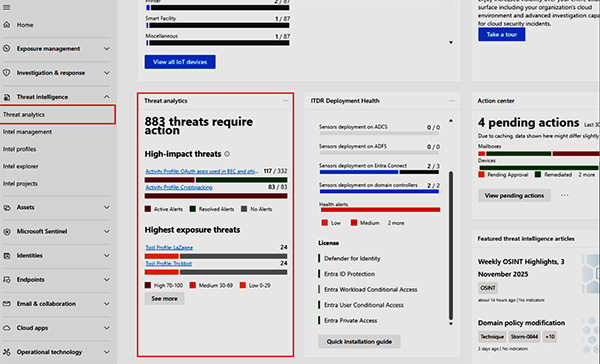
威脅情報分析報告
這些報告是相當寶貴的資源,能幫助我們掌握瞬息萬變的網絡威脅環境。它們深入分析了新興的威脅、攻擊模式和各種漏洞,讓企業組織能對潛在風險時刻保持警覺。
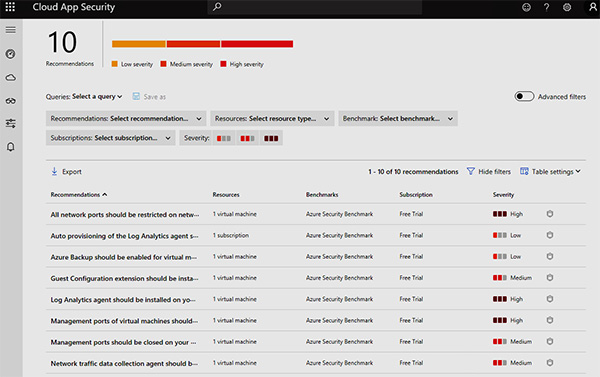
風險緩解建議
微軟與夥伴網絡安全服務供應商,會頻繁地提出專業建議,從而令你容易應對已知的安全風險。這些建議內容涵蓋了業界的最佳實踐 (Best Practice)、系統設定建議,以及如何善用各種保安工具。
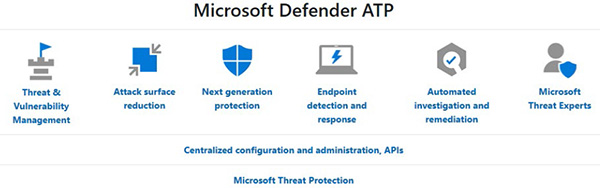
主動式防禦
微軟一直提倡主動出擊的網絡安全策略並實踐先進的保安解決方案,例如 Microsoft Sentinel、Microsoft 365 Defender 和 Defender for Cloud,這些方案提供了強大的威脅偵測、應變及防禦能力。
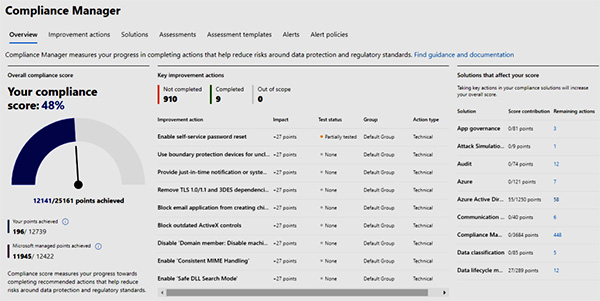
合規監管
微軟提供一系列工具和服務,協助不同行業滿足各種合規需求,例如歐盟的 GDPR (通用資料保護規則) 和美國的 HIPAA (健康保險流通與責任法案) 等。
安全意識
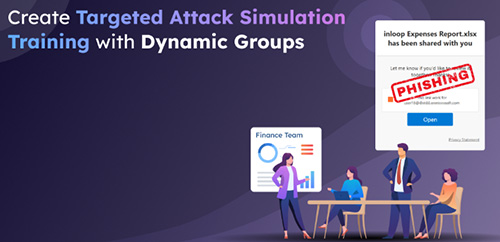
提升用戶和企業整體的網絡安全意識,是微軟策略中一個關鍵的環節。本中心與微軟聯手提供各種資源和培訓,旨在提升用戶識別及應對威脅的能力。例如定期使用微軟網絡攻擊模擬器來進行用戶安全意識測試及評估:
資料加密與存取控制
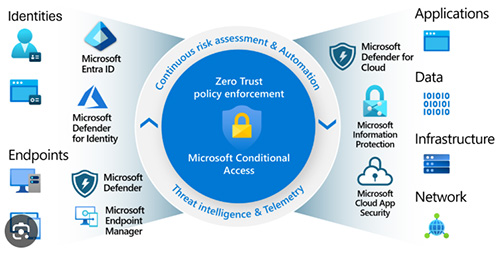
微軟特別強調資料加密和嚴格存取控制的重要性,這是保護敏感資訊的基石。在這方面,Azure Key Vault、Microsoft Information Protection、Microsoft Defender for Identity 和 Microsoft Entra ID (前稱: Azure AD) 扮演著不可惑缺的角色。
事故應變
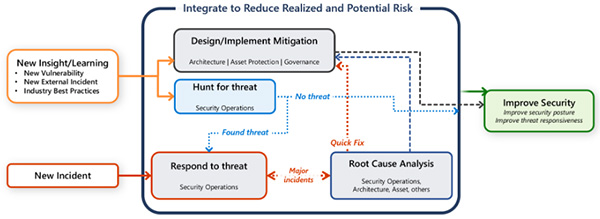
萬一發生安全事故或資料外洩,微軟也提供清晰的指引,指導如何高效應對。當中包括如何控制災情、進行調查的程序,以及通報的標準流程。若要回應事故,團隊成員必須以高效率且有效的方式彼此合作,才能消除威脅並符合法規要求。在面臨巨大壓力的情況下,人往往很容易慌亂及犯錯,這就是為什麼許多公司會制定事故回應計劃。計劃會定義人物角色和責任並包含所需的步驟,以便妥善解決、紀錄事故並進行相關溝通。
人工智能 (AI)
隨著人工智能 (AI),尤其是 Microsoft Copilot for Microsoft 365 / Azure OpenAI ChatGPT 等服務迅速融入現代辦公環境,保護敏感資料的挑戰變得更加複雜。為此,我們的課程已加入專門的單元,以涵蓋本認證考試中關於 AI 資訊保護的最新重點。
您將學習如何擴展 Microsoft Purview 的功能,以有效管治 AI 的使用,並在這個新時代中保護數據。
課程內容將包括如何應用資料外洩防護 (DLP) 策略,以偵測並攔截 AI 提示 (prompts) 和回應中的敏感資訊;如何強制執行資訊保護標籤,以控制 Copilot 處理機密資料的方式;以及如何利用「通訊合規性 (Purview Communication Compliance)」功能,監控 AI 輔助對話中的潛在風險。
這確保您不僅能充份準備考試,更能應對在 AI 時代下保護企業數據的真實挑戰。

Microsoft Certified Information Security Administrator Associate
「Microsoft Certified Information Security Administrator Associate」認證,證明您具備專業能力,能夠在 M365 雲端及混合環境中,部署必要的保安措施與威脅防護,為企業整個基礎架構中的資料和應用程式提供全面保護。
關於本課程:
本課程將會帶領您深入探討精心挑選的考試重點,並結合真實案例、實戰示範及商業應用場景,讓您徹底掌握如何部署、驗證及維護 Microsoft 365 各項資訊保護與合規功能。
在課堂內,導師會即時為大家分析不同 Microsoft 365 產品的優勢,並作出客觀評價。
此外,由於微軟已和眾多第三方廠商建立了緊密的資訊安全生態圈,課程中我們也會使用少部分時間,介紹一些市場上主流的微軟合作夥伴保安方案。
我們的資深導師 (Mr. Larry Chan) 將會憑藉他豐富的經驗,與您分享各種雲端保安產品的專業建議、實用技巧和獨家貼士。
| 課程名稱: |
Microsoft Certified Information Security Administrator Associate (1 科 Microsoft 365 商務雲端保安) 國際認可證書課程 - 簡稱:Information Security Administrator Training Course |
| 課程時數: | 30 小時 (共 10 堂,共 1 科) |
| 適合人士: | 有志考取 Microsoft Certified Information Security Administrator Associate 證書人士; 或 對雲端保安技術有興趣人士; 或 有 Microsoft 365 商務雲端基本認識人士; 或 有少量 Microsoft 365 使用經驗人士; 或 已修畢 Microsoft Certified 365 Fundamentals 國際認可證書課程 人士 |
| 授課語言: | 以廣東話為主,輔以英語 |
| 課程筆記: | 本中心導師親自編寫英文為主筆記,而部份英文字附有中文對照。 |
| 1. 模擬考試題目: | 本中心為學員提供模擬考試題目,每條考試題目均附有標準答案。 |
| 2. 時數適中: | 本中心的 Microsoft Certified Information Security Administrator Associate (1 科 Microsoft 365 商務雲端保安) 國際認可證書課程時數適中,有 30 小時。
令學員能真正了解及掌握課程內容,而又能於 3 個月內考獲以下 1 張國際認可證書:
|
| 3. 導師親自編寫筆記: | 由本中心已擁有五項 MCITP,十多項 MCTS、MCSA 及 MCSE 資格,並有教授 Microsoft 相關課程 20 年以上經驗的資深導師 Larry Chan 親自編寫筆記,絕對適合考試及實際管理之用,令你無須「死鋤」如字典般厚及不適合香港讀書格調的書本。 |
| 4. 一人一機上課: |
本課程以一人一機模式上課。 |
| 5. 免費重讀: | 傳統課堂學員可於課程結束後三個月內免費重看課堂錄影。 |
Microsoft 已公佈考生只要通過以下 1 個 Information Security 相關科目的考試,便可獲發 Microsoft Certified Information Security Administrator Associate 國際認可證書:
| 考試編號 | 科目名稱 |
| SC-401 | Administering Information Security in Microsoft 365 |
本中心為Microsoft指定的考試試場。報考時請致電本中心,登記欲報考之科目考試編號、考試日期及時間
(最快可即日報考)。臨考試前要出示身份證及繳付每科HK$943之考試費。 考試不合格便可重新報考,不限次數。欲知道作答時間、題目總數、合格分數等詳細考試資料,可瀏覽本中心網頁 "各科考試分數資料"。 |
|
課程名稱:Microsoft Certified Information Security Administrator Associate (1 科 Microsoft 365 商務雲端保安) 國際認可證書課程 - 簡稱:Information Security Administrator Training Course |
SC-401 Administering Information Security in Microsoft 365 (30 hrs)
1. Introduction to Information Potection and Data Lifecycle Management
1.1 Exploding Data
1.1.1 Regulation is increasing
1.1.2 Discovering and managing data is challenging
1.1.3 Defining an information and protection strategy
1.1.4 Protect and govern data wherever it lives
1.1.5 Unified approach to data discovery and classification
1.1.6 Balance security and productivity
1.2 Information protection and governance lifecycle
1.2.1 People
1.2.2 Process
1.2.3 Technology
1.2.4 Know your data, protect your data, prevent data loss, and govern your data
1.3 Know your data
1.3.1 Data classification concepts
1.3.2 Policies
1.3.3 Classify data directly in Office apps
1.3.4 Manual labeling on all platforms
1.3.5 Automated labeling in Office for the web and Windows
1.3.6 Automated labeling on content stored in OneDrive, SharePoint, and Exchange
1.3.7 Discover and classify Microsoft 365 content
1.3.8 Discover and classify on-premises files
1.3.9 Discover and classify cloud services and SaaS apps
2. Introduction to Security Features in Microsoft 365
2.1 Threat vectors and data breaches
2.2 The workplace and threat landscape
2.3 Phishing
2.4 Impersonation and Trusted Communications
2.5 Spam and malware
2.6 Account breach
2.6.1 Mitigating an account breach
2.6.2 Elevation of Privilege and Least Privilege
2.7 Data exfiltration
2.8 Data deletion and spillage
2.8.1 Preventing data deletion
2.8.2 Data Spillage and Accidental Oversharing
2.8.3 Preventing data spillage
2.9 Coin mining
2.9.1 How coin miners work
2.9.2 Examples of Coin Mining malware
2.10 Other attacks
2.10.1 Password cracking
2.10.2 Malicious insider
2.11 Security strategy and principles
2.11.1 Measuring security success
2.12 The defender's dilemma
2.13 Raise the attacker's cost
2.14 Microsoft Defender
2.14.1 Microsoft Defender for Office 365
2.14.2 Defender for Office 365 Policies
2.14.3 View Microsoft Defender for Office 365 reports
2.14.4 Automated Investigation and Response (AIR)
2.15 Microsoft Cloud Application Security
2.15.1 The Cloud App Security framework
2.16 Microsoft Defender for Endpoint
2.17 Microsoft Defender for Identity
2.17.1 Why use Microsoft Defender for Identity?
2.17.2 Monitor and profile user behavior and activities
2.17.3 Protect user identities and reduce the attack surface
2.17.4 Identify suspicious activities and advanced attacks across the cyber-attack kill-chain
2.18 Secure Score
2.18.1 Introduction to Secure score
2.18.2 How secure score works
2.18.3 Secure score dashboard
2.19 Improve your security posture
3. Threat Protection and Mitigation
3.1 Exchange Online Protection (EOP)
3.1.1 The anti-malware pipeline in Microsoft 365
3.2 Zero-hour auto purge (ZAP)
3.2.1 How ZAP works
3.2.2 Malware ZAP
3.2.3 Phish ZAP
3.3 Phishing and spoofing protection
3.3.1 Sender Policy Framework
3.3.2 Setting up SPF records for your domain
3.3.3 Domain Keys Identified Mail
3.3.4 Domain-based Messaging and Reporting Compliance
3.3.5 Spoof intelligence
3.4 Microsoft Defender for Office 365
3.4.1 Microsoft Defender for Office 365 expands on Exchange Online Protection
3.4.2 Safe Attachments
3.4.3 Safe Links
3.4.4 URL detonation
3.5 Microsoft Defender for Identity
3.5.1 Configure Microsoft Defender for Identity
3.5.2 Generate Microsoft Defender for Identity reports
3.6 Transport Rules
3.7 Using Message Disclaimer in Transport Rules
3.8 Implementing Ethical Wall by using Exchange Mail Flow Rule
4. Regular Expression Language
4.1 Introduction to Regular Expression and the ABCs
4.2 The 123s
4.3 The Dot
4.4 Matching specific characters
4.5 Excluding specific characters
4.6 Character ranges
4.7 Catching Repetitions
4.8 Characters optional
4.9 All this whitespace
4.10 Starting and ending
4.11 Match groups
4.12 Nested groups
4.13 More group work
4.14 Conditional OR
4.15 Other special characters
4.16 Matching decimal numbers
4.17 Matching phone numbers
4.18 Matching email address
4.19 Matching HTML
4.20 Matching specific filenames
4.21 Trimming whitespace from start and end of line
4.22 Extracting information from a log file
5. Data Loss Prevention
5.1 DLP for Enterprise Applications, Devices and Inline web traffic
5.1.1 Enterprise applications & devices
5.1.2 Inline web traffic
5.2 To create a DLP Policy from template to prevent disclosure of U.S. Social Security Number
5.3 More about Data Loss Prevention in depth
5.4 Creating a DLP Policy from 40+ Available Templates
6. Endpoint DLP
6.1 Onboarding Devices to Endpoint DLP via Intune
6.1.1 Prerequisites and Service Connection
6.1.2 Configuration Steps for Windows and macOS
6.1.3 Security Management for Microsoft Defender for Endpoint
6.2 Enable Microsoft Defender for Endpoint in Intune
6.3 Onboarding Windows Devices
6.4 Configure global Endpoint DLP settings
6.5 View Data Loss Prevention reports
6.5.1 Moreabout Reports
7. Data Lifecycle Management
7.1 An Introduction to Data Lifecycle Management
7.2 Retention policy precedence
7.3 Configure retention labels
7.4 Configure manual retention label policies
7.5 Configure auto-apply retention label policies
7.6 Import data for Data Lifecycle Management
7.7 Manage, monitor, and remediate Data Lifecycle Management
8. Records Management
8.1 An Introduction and Overview to Records Management
8.1.1 File plan
8.1.2 Record versioning
8.1.3 Customer scenarios
8.2 Import a file plan
8.3 What is a Regulatory Record
8.4 Configuring Retention Labels for Record Management
8.5 Preservation Lock
8.6 Event-Driven Retention
8.7 Managing Disposition of Data
8.7.1 Viewing Disposed Content
8.7.2 Disposition reviews
8.7.3 Configure a retention label (in a File Plan) for disposition review
8.7.4 Viewing and disposing of content
9. Communication Compliance
9.1 An Overview to Communication Compliance policies
9.2 Configuring an Offensive Language policy
9.2.1 The Case
9.2.2 Planning for communication compliance
9.2.3 Accessing Microsoft Purview Communication Compliance
9.2.4 Configuring prerequisites and creating a communication compliance policy
9.3 Creating the policy to monitor for offensive language
9.4 Investigate and remediate alerts
9.5 Deciding the remediation action on policy match
9.5.1 Resolve
9.5.2 Power Automate
9.5.3 Tag as
9.5.4 Notify
9.5.5 Escalate
9.5.6 Escalate for investigation
9.5.7 Remove message in Teams
9.6 Communication Compliance Reports
9.7 Detecting Generative AI Interactions
10. Insider Risk Management
10.1 Introduction to Insider Risk Management
10.2 Risk Pain Points in the Modern Workplace
10.3 Common insider risk scenarios
10.4 Insider risk management workflow
10.5 Concepts of Insider Risk Policies
10.5.1 Components of a policy
10.5.2 Policy dashboard
10.5.3 Policy templates
10.5.4 Insider Risk Management General settings
10.5.5 Policy Indicators
10.5.6 Policy timeframes
10.5.7 Intelligent detections
10.6 Create and manage insider risk policies
10.6.1 Required roles or permissions to manage Insider Risk Policies
10.6.2 Potential dependencies
10.7 Investigate insider risk alerts
10.7.1 Alert dashboard
10.7.2 Alert status and severity
10.7.3 User activity reports
10.8 Take action on insider risk alerts through cases
10.8.1 Case overview
10.8.2 Case dashboard
10.8.3 User activity
10.8.4 Content explorer
10.8.5 Case actions
10.8.6 Insider risk management notice templates
10.9 Insider Risk Management Forensic Evidence
10.9.1 Introduction to insider risk management forensic evidence
10.9.2 Capturing options and workflow
10.9.3 Configure and Manage Forensic Evidence
10.9.4 Viewing captured clips
10.9.5 Alerts dashboard
11. Microsoft 365 Encryption
11.1 Introduction to Microsoft 365 encryption
11.2 How Microsoft 365 data is encrypted at rest
11.2.1 BitLocker volume level encryption
11.2.2 Service level encryption
11.3 Service encryption in Microsoft Purview
11.4 Customer Key Management using Customer Key
11.5 How data is encrypted in-transit
12. Microsoft Purview Message Encryption
12.1 Implement Microsoft Purview Message Encryption
12.1.1 Verify information rights management functionality
12.1.2 OME branding templates
12.2 Microsoft Purview Advanced Message Encryption
12.3 Microsoft Purview Message Encryption templates in mail flow rules
13. Microsoft Purview Information Protection
13.1 About Senstivity Label and Sensitive Information Type
13.2 Configure sensitivity labels
13.3 Configure sensitivity label policies
13.4 Auto-labeling policies of Sensitive Data
13.5 Manage, monitor, and remediate information protection
14. Data Security Posture Management (DSPM)
14.1 DSPM Overview
14.2 Data security objectives
14.3 How AI helps achieve data security outcomes
14.4 How to use Data Security Posture Management
14.5 Setup tasks for Data Security Posture Management
15. Data Security Posture Management for AI
15.1 DSPM for AI Overview
15.2 Using DSPM for AI
15.3 Security Copilot Integration in Microsoft Purview