 付款。
付款。(在家觀看 = 0%,在校觀看 = 100%)
100% 在校觀看日期及時間:
自由選擇,點選以下地區觀看辦公時間及位置

課時: 18 小時
享用時期: 9 星期。進度由您控制,可快可慢。
課堂錄影導師:Larry
在校免費試睇:首 1 小時,請致電以上地點與本中心職員預約。
本課程提供在校免費重睇及導師解答服務。
(在家觀看 = 100%,在校觀看 = 0%)
100% 在家觀看日期及時間:
每天 24 小時全天候不限次數地觀看
課時: 18 小時
享用時期: 9 星期。進度由您控制,可快可慢。
課堂錄影導師:Larry
在校免費試睇:首 1 小時,請致電以上地點與本中心職員預約。
本課程提供導師解答服務。
微軟為您的企業提供 AI 整合式解決方案 - Microsoft 365 Copilot 與智能代理 (Agents) 的強大功能,令使用 Microsoft 365 的您進入 AI 協作新時代。掌握生成式 AI 商務應用,成為 AI 時代的生產力領航者!
Microsoft 365 Copilot 正重塑現代商務工作流程,它已不僅是對話工具,更是能自動執行任務的智能代理 (Agent)。
本課程專為應考 Microsoft Certified AI Business Professional 認證考試而設,助您在無需編程的情況下,全面掌握 Copilot 與智能代理 (Agent) 的商務應用能力,並通過考試。
微軟為您的中小企業提供整合式解決方案,極大幅度地節省購買軟件使用授權 (Software License) 的成本及I.T. 相關硬件基建 (Hardware and Server infrastructure) 等等開支!
AI 技術助您事半功倍
|
 |
AI 技術助您提升共同作業成效
|
 |
AI 技術保護您的資料安全
|
 |
Microsoft 365 商務基本版 (Business Basic) 是可取得 Microsoft 365 Copilot Business AI 服務的基礎!
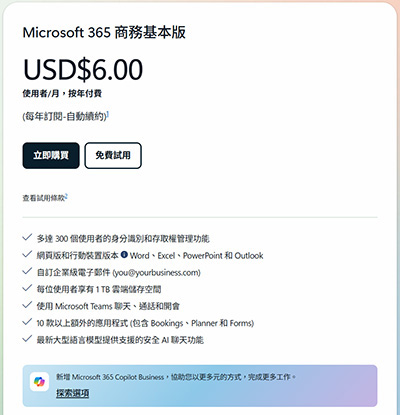
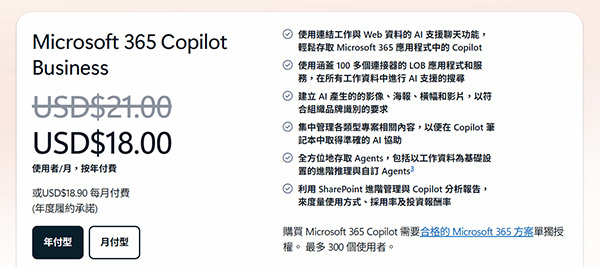
總結來說,每位使用者僅須付月費 USD $24 (~ HKD $197),便可以獲得包含 Microsoft 365 Business Basic + Copilot Business, Purview 以及 Microsoft Entra ID 等等一系列安全管理服務!
本課程將教導企業如何以最低成本 (Business Basic + Copilot Add-on) 配置最強 AI 辦公環境,避免購買不必要的昂貴授權。
為什麼要學 Agent?近年,AI 不再只是對話框,而是能自動執行任務的『代理 (Agent)』。本課程領先市場,涵蓋 Agent 的建立與管理。
除了上述的 Copilot 及 Agent 的根基外,本課程會向您傳授進階級的 Copilot 及 Agent 的專業知識,例如:
- 撰寫高效率提示詞 (Efficient Prompt Engineering) 的技巧 (G-C-S-E 框架)
- 在提示詞中引用適當資源 (Knowledge),提升 AI 輸出精確度及排除幻覺
- 儲存、排程及分享提示詞,建立團隊共享的提示詞庫
- 管理 Copilot 對話記錄:搜尋歷史對話、重新命名、刪除及加入筆記本
- 智能代理 (Agent):使用範本快速建立專屬代理、設定知識庫與指令、與團隊成員共享自動化代理
- 使用提示詞 (Prompt) 從零建立商務文件,或基於現有資訊生成全新內容
- 自動生成文件管理摘要,跨應用程式 (Word、Excel、PowerPoint) 搬運數據與洞見 (Insights)
- 在 Microsoft Teams 會議中運用 Copilot 即時總結重點與行動計劃
- 使用 Copilot 進行團隊協作,管理 Copilot 的記憶功能與個人化指令
本課程教授的技術適用於各大中小型企業,能讓員工發揮出頂級的 AI 人機協作生產力,並能保護各個裝置及雲端上的商務資料,為大中小型企業提供了一個完善的解決方案。
本課程聚焦於商務人員使用 Copilot 及 Agent 提升生產力,課程涵蓋負責任使用 (Responsible AI) 與數據保護 (Purview Information Protection),包括識別提示注入風險、防止過度依賴 AI 輸出,以及理解資料保護如何限制生成的結果 — 助您在善用 AI 的同時,保護企業商務機密。
修畢本課程後,學員便可考取下列 1 張國際認可證書:

Microsoft Certified AI Business Professional
| 課程名稱: |
Microsoft Certified AI Business Professional 國際認可證書課程 (1 科 M365 商務雲端,Copilot 及 Agent) - 簡稱:Microsoft AI Business Training Course |
| 課程時數: | 18 小時 (共 6 堂,共 1 科) |
| 適合人士: | 有志考取 Microsoft Certified AI Business Professional 證書人士 中小企業老闆 / 管理層 / 商務人士 創業青年 初級技術支援人員 或 任何行業的非技術文職人員 |
| 授課語言: | 以廣東話為主,輔以英語 |
| 課程筆記: | 本中心導師親自編寫英文為主筆記,而部份英文字附有中文對照。 |
| 1. 模擬考試題目: | 本中心為學員提供模擬考試題目,每條考試題目均附有標準答案。 |
| 2. 時數適中: | 本中心的 Microsoft Certified AI Business Professional 國際認可證書課程 (1 科 M365 商務雲端,Copilot 及 Agent) 時數適中,有 18 小時。
令學員能真正了解及掌握課程內容,而又能於 2 個月內考獲以下 1 張國際認可證書:
|
| 3. 導師親自編寫筆記: | 由本中心已擁有五項 MCITP,十多項 MCTS、MCSA 及 MCSE 資格,並有教授 Microsoft 相關課程 20 年以上經驗的資深導師 Larry Chan 親自編寫筆記,絕對適合考試及實際管理之用,令你無須「死鋤」如字典般厚及不適合香港讀書格調的書本。 |
| 4. 一人一機上課: |
本課程以一人一機模式上課。 |
| 5. 免費重讀: | 傳統課堂學員可於課程結束後三個月內免費重看課堂錄影。 |
Microsoft 已公佈考生只要通過以下 1 個 Microsoft 365 AI 相關科目的考試,便可獲發 Microsoft Certified AI Business Professional國際認可證書:
| 考試編號 | 科目名稱 |
| AB-730 | Microsoft Certified AI Business Professional |
本中心為Microsoft指定的考試試場。報考時請致電本中心,登記欲報考之科目考試編號、考試日期及時間
(最快可即日報考)。臨考試前要出示身份證及繳付每科HK$566之考試費。 考試不合格便可重新報考,不限次數。欲知道作答時間、題目總數、合格分數等詳細考試資料,可瀏覽本中心網頁 "各科考試分數資料"。 |
|
課程名稱:Microsoft Certified AI Business Professional 國際認可證書課程 (1 科 M365 商務雲端,Copilot 及 Agent) - 簡稱:Microsoft AI Business Training Course |
Exam AB-730: Microsoft AI Business Professional
1. Generative AI Introduction
1.1 What is Generative AI?
1.1.1 Why is generative AI important as a business user?
1.1.2 How does generative AI work?
1.1.3 How can generative AI help me?
2. Microsoft Responsible AI
2.1 Responsible AI principles
2.1.1 Fairness
2.1.2 Inclusiveness
2.1.3 Reliability and Safety
2.1.4 Privacy and security
2.1.5 Transparency
2.1.6 Accountability
2.1.7 What are the responsible AI features in Microsoft 365 Copilot?
2.1.8 Is my data kept private and secure?
2.1.9 Avoid overreliance
2.2 Enterprise data protection in Microsoft 365 Copilot and Microsoft 365 Copilot Chat
2.2.1 Enterprise data protection for prompts and responses
2.2.2 Ground responses in latest data
2.2.3 How can I guide AI ethical decision-making?
2.3 Microsoft 365 Copilot as your workflow companion
3. Copilot Chat as your AI assistant
3.1 What is Copilot Chat?
3.1.1 Access Copilot Chat
3.1.2 Work and Web modes in Copilot Chat
3.1.3 How to chat in three steps
3.1.4 Copilot Memory
3.1.5 Search with Copilot Chat
3.2 Writing effective prompts to optimize Copilot responses
3.2.1 Add references to your prompts
3.2.2 Voice commands in Copilot Chat
4. Manage prompts and conversations in Copilot Chat
4.1.1 Saving a Prompt
4.1.2 Schedule a Prompt
4.1.3 Share a Prompt
4.1.4 Managing Conversations in Copilot Chat
4.1.5 Delete a chat
4.1.6 Rename a chat
4.1.7 Adding a conversation to a Notebook
5. Behind the Scenes
5.1 Introduction to Digital Workspace in Agentic AI era and Copilot
5.1.1 Introduction to Microsoft 365 Copilot
5.1.2 Microsoft 365 Copilot architecture
5.1.3 Microsoft Graph + Work IQ: Copilot’s intelligence foundation
5.1.4 Large Language Models (LLMs)
5.1.5 Copilot orchestration service
5.1.6 Introduction to the Copilot prompt lifecycle
5.2 Agents Overview
5.2.1 Types of agents
5.2.2 Agents in Microsoft 365 Copilot Chat
5.2.3 Agents in SharePoint
5.2.4 Tools used for creating agents in Copilot Chat and SharePoint
5.3 Compare Microsoft 365 Copilot and agents
5.3.1 Compare core capabilities and key benefits
5.3.2 Explore how Copilot and agents support productivity and automation
5.3.3 Best practices for managing governance, identity, and runbooks
5.3.4 Operational limitations and common failure modes
5.4 Compare Microsoft 365 Copilot licensing models
5.4.1 Copilot licensing plans and feature comparison
5.4.2 Examples that describe key differences
5.4.3 Microsoft 365 Copilot monthly license model
5.4.4 Pay-as-you-go Copilot model
5.4.5 Differences between licensing models
5.4.6 License implications for Microsoft SharePoint
5.4.7 Cost considerations and budgeting tips
6. Crafting Effective Prompts
6.1 Simplify and extract key information with Copilot in Word
6.2 Identify key information and summarize with Copilot in PowerPoint
6.3 Spot trends and visualize data with Copilot in Excel
6.4 Highlight key decisions and actions from Teams meetings
6.5 Catch up and prepare for the week with Copilot in Outlook
6.6 Summarize information on a topic with Microsoft 365 Copilot Chat
7. Creating and drafting with Microsoft 365 Copilot
7.1 Draft cover letters, marketing plans, and outlines with Microsoft 365 Copilot in Word Referencing sources
7.2 Build new slides, agendas, and to-do lists with Microsoft 365 Copilot in PowerPoint
7.3 Draft emails, replies, and meeting agendas with Microsoft 365 Copilot in Outlook
7.4 Brainstorm new ideas, lists, and reports with Microsoft 365 Copilot Chat
8. Edit and Transform content with Microsoft 365 Copilot
8.1 Write, organize, and transform content using Microsoft 365 Copilot in Word
8.2 Add images, slides, and organize your presentation using Microsoft 365 Copilot in PowerPoint
8.3 Format, sort, filter, and highlight data using Microsoft 365 Copilot in Excel
8.4 Rewrite messages and replies for tone using Microsoft 365 Copilot in Outlook
9. Ask questions and Analyze content with Microsoft 365 Copilot
9.1 Ask Microsoft 365 Copilot in Word for help and recommendations
9.2 Get design and organization tips with Microsoft 365 Copilot in PowerPoint
9.3 Analyze and work with tables using Microsoft 365 Copilot in Excel
9.4 Ask questions about your notes using Microsoft 365 Copilot in OneNote
9.5 Ask about your meetings and messages with Microsoft 365 Copilot in Teams
9.5.1 Access Copilot during a meeting
10. Creating and Managing Microsoft 365 Copilot agents
10.1 Create a Microsoft 365 Copilot Chat agent - Part A
10.1.1 Use the Describe tab (if available) to begin the agent creation process
10.1.2 Create a Microsoft 365 Copilot Chat agent - Part B
10.2 Manage user access and permissions for Agents
10.2.1 Licensing and agent types
10.2.2 Overview to configuring user access to agents
10.2.3 Assign a Copilot license in the Microsoft 365 admin center
10.2.4 Assign an environment role in the Power Platform admin center
10.2.5 Group-based role assignments
10.2.6 Security best practices
10.3 Agent approval and governance
10.3.1 Agent types you can manage
10.3.2 Understanding the approval process for agents
10.3.3 Role of admins and stakeholders in the approval process
10.3.4 Managing agent updates and version control
10.3.5 Governance policies for agent deployment
10.3.6 Security and compliance considerations
10.4 Agent Testing
10.4.1 Introduction to Testing an Agent